Over the past 12 months, I have been moving beyond using AI as a chat tool, and towards building AI-supported workflows that help me to be a better product manager. This blog post covers how I am using Claude to help me and my team with daily stand-ups. This includes the daily stand-up note it generates for us, and my workflow for taking report content from suggested action, through to draft and completion.
/daily-stand-up-note
What is this?
At one of our regular retrospectives, we agreed that we wanted to see how we could use AI to help us with some of our processes and ways of working. Generative AI is probabilistic - it can make mistakes. So having a single source of truth that we all looked at reduced the risk of inaccurate information not getting spotted. It also saved on tokens. So we decided to generate a shared report that we could all access. I took forward this action, and iterated it with the team based on feedback. This is where we ended up!
Every morning before I start work, Claude creates a daily stand-up note in Notion, and posts a link into the team Slack. It contains the following content:
| What it does | Why this is useful |
|---|---|
| Scans team content in Slack, Linear and Notion. | These are all the tools we use to plan and track work. |
| Summarises key changes or decisions in the past 24 hours. | Captures at a glance the big decisions/progress in the past 24 hours. |
| Lists open RFCs with status & due date. | Encourages us to contribute to and resolve RFCs in good time. |
| AI generated project status (off track/at risk/on track with explanation) based on all the project information available in our tools. | Gives early visibility of project risk with minimal human effort. |
| Status update on all project issues that need attention. Split by: Done, WIP, Stale & Blocked (full definitions at the bottom of the post if you are interested). | Focuses on the big questions that stand-up is designed to answer: how can we unblock this? How can we make progress on this stale ticket? Who needs help? |
| Issues with no priority, no estimate, or not in cycle but perhaps should be. Includes total counts, with any new since yesterday called out specifically. | Work not getting correctly prioritised, estimated or tagged to the cycle was causing us problems, so visualising them every day helps us catch them. |
| A by person view of all the above work | As a product manager, I am more interested in everything the team are doing. But that’s too much information for some ICs, who prefer to stay focused on what is assigned to them. |
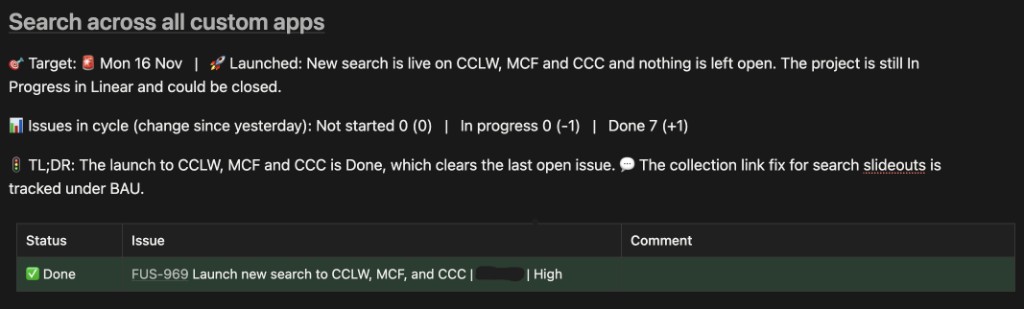
Here is an example update on one of our projects. I will come back to this later on in the blog post.
How does this help?
- Faster access to actionable information. This leads to blockers or impediments getting removed faster, risks being understood earlier, and more effective stand-ups.
- Makes it harder for things to fall through the cracks. Late RFCs, stale work and poorly written Linear tickets are now more visible and take less human effort to stay on top of.
- Encourages better use of our tools. Keeping work up to date in tools like Linear and Notion now comes with an extra reward: people are less likely to ask you for an update.
Quantitatively, Notion analytics shows that a small majority of the team are looking at these notes every week. So I am not the only one who is finding them useful. But this is not a replacement for stand-up in its current form.
/daily-actions
What is this?
Every morning, after I have read the report, I fire up Claude Code and run a skill called /daily-actions. This skill takes today’s daily stand-up note as an input and suggests actions that I should take as a product manager, walking me through each action one by one. For each action, it gives me multiple choice options for how I want to proceed. This can include actions like chasing stale tickets, unblocking work, or updating stakeholders. In the example below, Claude identifies that all the work in a project has been done, and suggests I write a final project update and share it with the team.
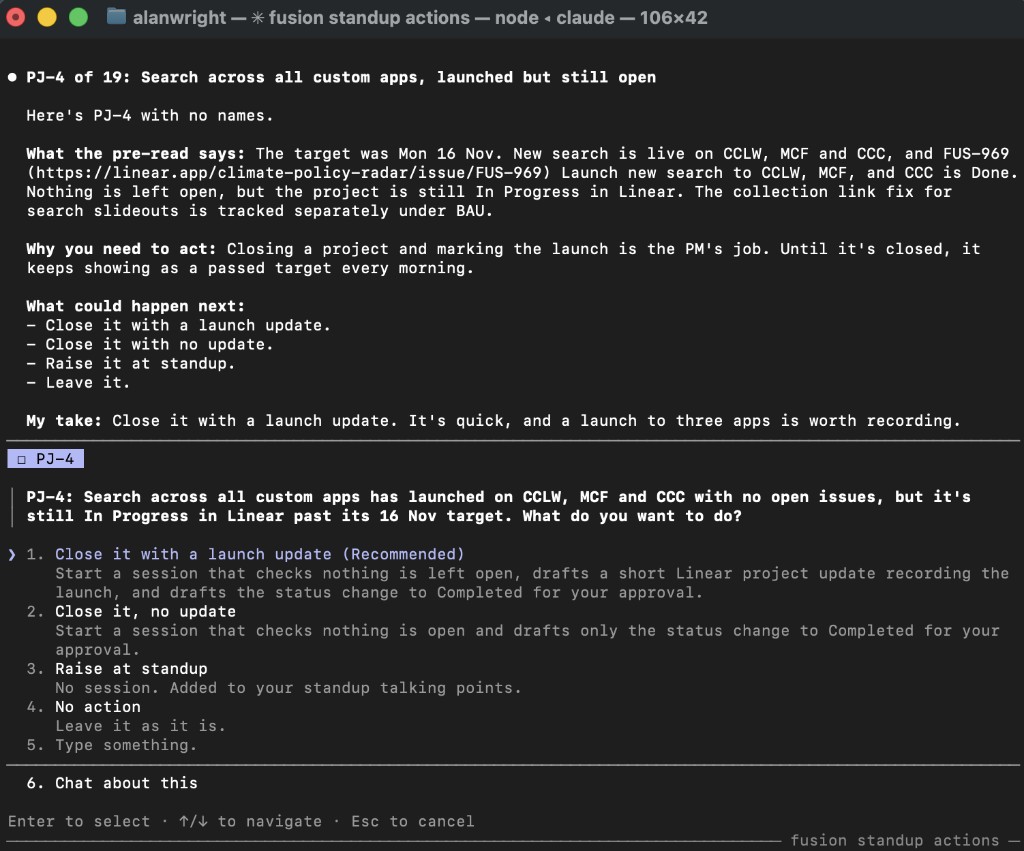
Once all questions are answered, it starts separate background Claude sessions for each action I want Claude’s help to take forwards.
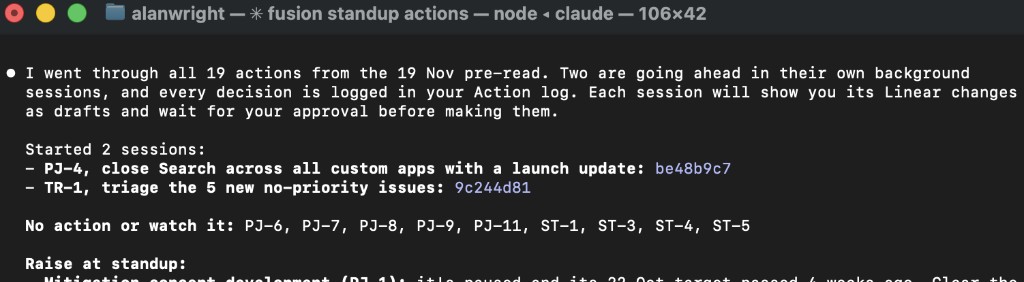
Here is the final version of the project update I created with Claude in the example above, complete with the edits I asked for.
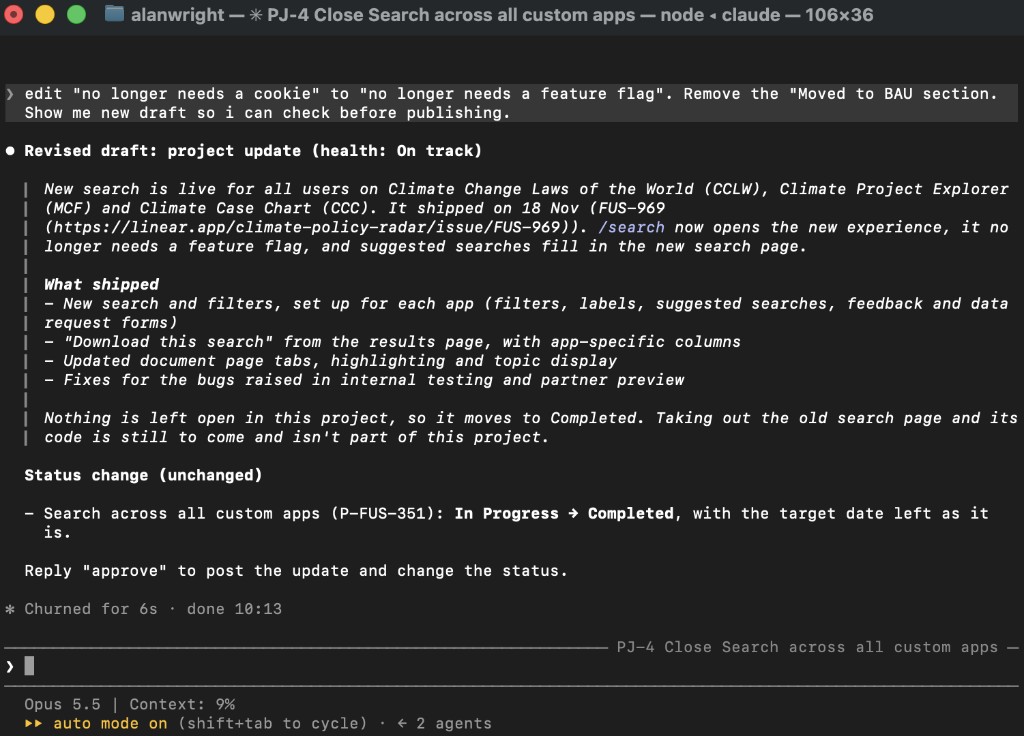
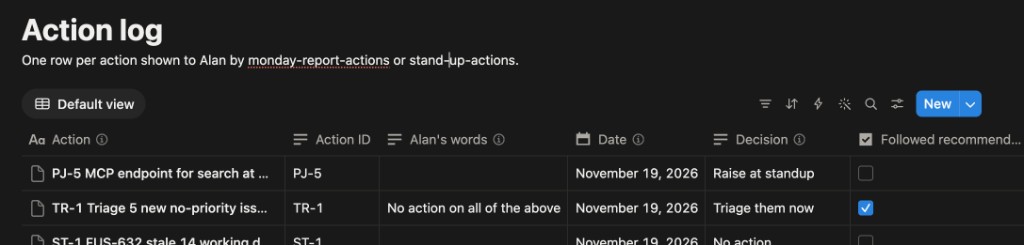
Finally, Claude logs all of my decisions in a decision log that I keep in Notion. See the example below.
How does this help?
- It saves me time. Having actions recommended, drafted and done on my behalf is faster than having to do it all manually. I have done all of these things for years, so I know what good looks like. And as a manager, I am used to reviewing outputs from others and approving/rejecting work or giving feedback. Using this AI assistant, when I think “That’s a good point, I should probably do that”, it just starts happening with one click. And that action gets tracked alongside the other tasks in my Claude OS.
- Better, more complete actions. Whilst I know what good looks like, I am often very busy. Small, non-urgent, yet important activities have a habit of falling through the cracks - such as the ways of working improvements we agree on at retros. Claude knows how I and my team like to work - that info is shared in a /context file. So it helps keep me honest, and keep my work in line with the way I should be working. Yes, this skill sometimes recommends me actions that I choose to ignore. But it takes seconds for me to move on from those, so that is of little consequence.
How it all works
Claude is connected to all our company tools via MCP. Every day, Claude runs a scheduled task to digest all of the content from those sources and to generate the report. The /daily-actions skill reads the report and generates actions upon request. I am using Claude Code, but this is also easy to do in other tools such as the Claude web app, ChatGPT and Cursor. The content I wrote in Using Cursor and MCP as a Product Manager is still relevant here. The key change is the addition of scheduled tasks, and better integrating Claude into workflows.
This was easy to create, and required no real technical knowledge. I simply asked Claude to create it for me, then reviewed the work and told it how to improve. Everything was created via the Claude chat interface. I also asked Claude for suggestions for how to improve - that is how I came up with the idea of creating the decision log for Claude to learn from.
What’s next?
I wrote how to run a daily stand-up more than 3 years ago. I imagine that this time next year I might be making some pretty big revisions to that post! I have read about how some teams are fundamentally rethinking how they do daily stand-up in response to everyone having access to AI tooling to help them synthesise information. Perhaps we just focus on what we need help with, assuming that everybody already knows what everyone has done and is doing? I am nervous about losing the social element of stand-up - especially for a remote-first team. This is something I am keen to explore.
Claude is recording every action it recommends and every decision I make in a decision log. My plan is to use this to help the system learn so that it can make better recommendations. I don’t want to over optimise here though - per the above, as long as it takes me a couple of seconds to ignore recommendations I don’t like, I’d rather take some time to consciously say no than miss actions that I should be considering.
I am also intrigued by the idea of Claude doing more of this work automatically. A good place to start is Claude starting to draft the work required to action its recommendations before I confirm my decision. Longer term, I could allow Claude to complete more actions on my behalf without me approving them first. This is something I am already doing in some ways - the generation of the daily stand-up report is one example. For this to be something I do more often, I would need to have more confidence in the model outputs, and that the reward outweighs the risk.
Beyond stand-ups, I am starting to apply this pattern in other areas of my work. I have a weekly report and action process that is starting to help me stay on top of activities like competitor research, user feedback and product analytics. I have already had a lot of success automating some of the analytics techniques I mentioned in my post about how I use Claude for data analysis. More on this one will likely follow in another post!
Final word
I am already getting a lot of value from this pattern of using AI to help digest content, suggest actions in multiple choice, draft the response and complete the action. I am increasingly using Claude Code as my personal operating system, doing more and more work inside the tool. As someone with a passionate interest in systems, knowledge management and productivity, I am also having a lot of fun experimenting with these ways of working.
Appendix
Definitions
- ✅ Done: moved to done since yesterday’s pre-read.
- 🏗️ WIP: in progress, review or verification, and its status changed or the team commented since yesterday.
- 📊 Issues in cycle: issues in this project in the active cycle, by status. Brackets show the change since yesterday’s pre-read.
- 🎯 Target: the project’s target date in Linear, plus an assessment (🚀 Launched, 🟢 On track, 🟠 At risk, 🔴 Behind) and why.
- 📈 Forecast: when the project’s open issues (all of them, not just this cycle’s) should be done at the rate points were completed over the last 3 weeks. Issues with no estimate count as 1 point. “Rough” means many issues have no estimate or little was completed recently.
- ⏰ Stale: in progress, review or verification with no update for more than 24 working hours (Mon to Thu), longest first.
- ⛔ Block: in Blocked, with what blocks it and how long it has been blocked.
- Cycle level reporting: totals come from the linked Linear views, and only issues created since yesterday are listed.
- 📝 Open RFCs: Fusion RFCs in the Decision & RFC log that are Open, or in Draft and edited in the last 14 days or with a decision date still ahead. 🆕 means created since yesterday.
- 👤 By person: the same issues as the project tables, grouped by assignee, with each person’s in-cycle counts. Collapsed by default: click the heading to open it.
- Issue cells: issue, then assignee, then priority, e.g. FUS-123 Title | Sam | High.